
Terms & Conditions
CUSTOMERS SHOULD BE AWARE THAT THE INFORMATION HEREIN FORMS THE BASIS OF OUR TERMS AND CONDITIONS OF TRADE. IF YOU HAVE ANY QUERIES ABOUT ANY OF THE TOPICS BELOW, PLEASE EMAIL US USING THE 'CONTACT US' LINK AT THE BOTTOM OF OUR HOMEPAGE.
CONTENTS OF THIS PAGE:
Click on any of the following headings to go straight to that section
First Time Visitors
If you are new to shopping with GPS Imports, you can checkout as a Guest or choose to Sign Up and register your details with us.
Returning Customers
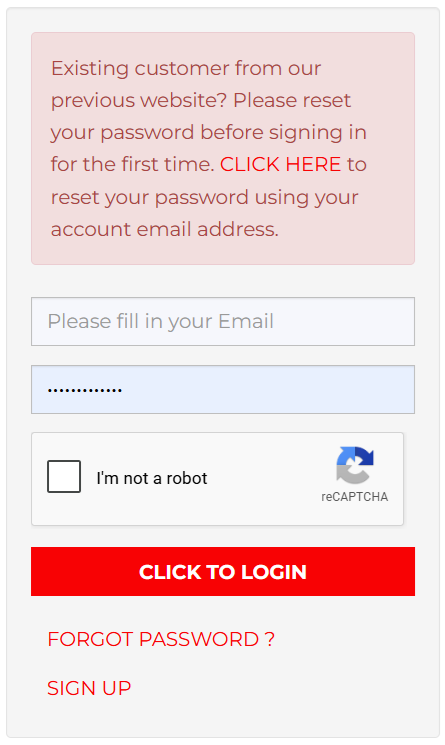
If you are a Member or Registered User from the old GPS site and this is your first time on the new site, you will need to reset your password to access your profile and order histories. To do this you will need the email address that you originally used to sign up. If you don't have that address anymore, you'll need to sign up afresh. See instructions in the log-in panel on our homepage. First-time returning customers please use the link in the pink box, as below.
Guest, User, Member - Which am I?
If you choose to use the site as a Guest, ie. without registering your details, none of your information will be saved after checkout and the only record you have of your order is the auto-generated order confirmation sent to the email address you provided at checkout
If you wish to save your order history and do other things like request quotes, and save carts and wishlists for future use, then you need to register as a User on the site. As a registered User, you also have the option to join up as a Member of our Mailing List. Subscribing to our Mailing List (use the link on our homepage) has the added benefit of allowing you to access discounts on many of our products. Please note that your activation as a Member may take several hours. You will see the discounts in your cart and on listed product pricing once the activation is complete.
GPS Members - Importance of Logging-in
When using the site as a Member, please be sure to log-in. Member discounts will only show on the site pages and in your cart if you are logged-in. Orders placed on the site without logging-in will not be displayed in your Order History and will not receive the Member Discount.
GPS Members - Ordering by phone
Member discounts are only available on orders placed through the website. Members placing orders outside of the website shopping cart (by phone, for instance) cannot access product discounts nor can they access the free-freight concession (see 'Freight & Handling Charges' below).
Members-Only Promotions
As a registered & subscribed Member, you may, from time to time, be elligible for additonal discounts on specific items or product lines in line with advertised promotions. Please keep an eye on your email and stay subscribed to our mailing list to take advantage of these promotions.
The format of our Member promotions varies, but the message is always the same: we value your custom and want you to make the most out of the products and services we have on offer. If you're not sure you're getting the notifications, it's worth checking your email spam settings; if in doubt, you can view details of current promotions by using the link at the bottom of the page.
IMPORTANT: it is a condition of the Member discount that you remain subscribed to our mailing list and that you keep your email contact up-to-date. Failing to do so will result in your Member discount being deactivated.
Users & Members - Updating Your Details
User & Member: update your contact details in your Account profile (top right corner of the homepage) whenever they change.
Member only: update your mailing list contact info by hitting the 'Sign Up Now' button at the bottom of our homepage and refilling the form. If you don't keep your email address up-to-date you will void your discount.
Overseas Customers
Although there are some rare exceptions (by arrangement), the only locations we ship to from our web store are Australia (and its territories) and New Zealand. New Zealand customers please see 'Freight & Handling Charges - Overseas Customers' below for information on postage. Member and Trade Discounts are not available to overseas customers.
Privacy Policy
The only time GPS Imports Pty Ltd will ever ask you for your private information (eg. your name, delivery address, contact or payment info) is when you place an order or when/if you subscribe to our mailing list. We do not keep your payment info and we will not share your personal information with any third party without your express permission; this excludes payment providers (eg. Mastercard, Visa & PayPal), our delivery partners (Auspost, etc, for the express purpose of delivering your order) and our mailing-list hosters (MailChimp), where your permission is automatically implied by virtue of your use of our web store and/or your subscription to our mailing list.
Product Search - Is it in stock?
There are several search options available: vehicle make (eg. 'Vespa', 'Piaggio'', 'Yamaha'', etc.); product brand (manufacturer of the part); part category; part name; part number; keyword(s). With the exception of keyword(s), these search options can be used in combination with each other to filter your search.
Please note that, for the time being, the main search bar on the site allows you to filter your search by vehicle make, but not by vehicle model. This is largely due to the huge amount of cross-over between models made by Piaggio and Piaggio Group companies, as well as the cross-compatability of many engine parts on vehicles using the Asian-made GY6 engine platform. However, you can search by keyword, including model identifiers, both in the main search bar on the homepage and in the search field at the top of each page.
We work hard to provide as much 'legacy data' - eg. model fitment, chassis number range, applicable model years, part supersessions, etc - for each of our listed products as is feasible within the framework of our existing database. This information, where available, is shown in the product description for each item that we sell. However, the success of your search relies heavily on your own knowledge of the vehicle: knowing year of manufacture, engine and chassis numbers and prefixes/model identifiers, and, where possible, original part numbers, will all help you to narrow down your search.
To avoid confusion between similar parts, similar vehicle models and, in some cases, different production versions of the same vehicle model, please always read the full item description before adding the item to your cart.
For more information on part numbers for vintage models see the 'Parts Books & Resources' link at the bottom of the homepage.
Items which are currently in stock are shown as such in the product gallery view and in the individual product profile. The website also gives you the current stock level for each product. If the quantity you require is greater than the stock quantity indicated on the site, please send us a product enquiry via the website.
Whilst stock discrepancies can occur, they are rare and, 99% of the time, the website shows real-time stock availability. Any discrepancy discovered during the order picking process will be notified to you immediately.
Out of Stock Items
We have over 10,000 listed product lines and well in excess of 60,000 individual parts physically in stock at our warehouse at any one time, spread across a broad range of core product brands and vehicle marques & models. For this reason, it is generally not possible to have all items in stock all the time.
If an item is not in stock, it will display as 'Out of Stock' on the site. You'd be astonished by how many calls we get from people asking if this or that item is really out of stock. Yes, it really is - there's no secret supply laying uncounted in a dusty back office. That said, it's always worth sending an enquiry to find out when the next delivery will be as we have shipments rolling in from various suppliers every couple of weeks.
Specials and Runouts
Products listed in the 'Specials' category are listed at their discounted price and do not qualify for any further discount. These items are based on existing stock levels and therefore subject to stock availability. Any backorders will be charged at the normal retail price.
Wishlists, Backorders & Special Orders
A 'backorder' is an order for a part that is currently not in stock. On the old site, backorders were created automatically when, for one or more items in a customer's order, the customer had specified a desired item quantity that was greater than the current stock level. That is not a function that is presently offered by the new site - the shopping cart is set to only permit orders up to the real-time stock limit, so the only way to backorder additional quantity, or items showing as 'Out of Stock', is to send a product enquiry.
If a backordered part is not available within a fortnight of the given ETA, you have the option of cancelling the order and, if you have prepaid, receiving a refund. Exceptions to this are items listed on the website as "POA" or items (including products not normally listed as part of our stock line) notified to you at the time of your order as "Special Order Only" - such orders cannot be cancelled under any circumstances and no refund will be given.
If you wish to pre-pay your backorder you can notify us of this when you initially make your enquiry. Pre-payment can dramatically speed-up the re-stocking process and guarantees that your order will be filled from the next incoming shipment and, international conflicts and global pandemics permitting, at the price listed at the time of your order. Without pre-payment, your order may be subject to price fluctuations and, where demand for a certain item exceeds the current supply, may not be given the same priority as pre-paid orders from other customers.
'Special Orders' for a non-stock item or a listed 'POA' item cannot be placed through the shopping cart. You will need to contact us with details of the item you require (preferably the manufacturer part number) and request a quote on price and availabilty/ETA. Once we have provided that information - which can take a number of days, depending on the speed of response from our suppliers - you can decide to confirm or cancel the order. Please note that Special Orders are strictly prepaid and non-refundable. Delivery timelines are approximate and we accept no responsibilty for delivery delays as these are, invariably, beyond our control.
If you are a Registered User, the 'Wishlist' system - created within the shopping cart and accessible via your Account profile - allows you to keep a note of items that you may wish to purchase at a future date. You can record both 'In Stock''and 'Out of Stock' items in the Wishlist. When an 'Out of Stock' item comes back into stock, the 'Add to Cart' button will appear in your Wishlist alongside that item, signifying that it is available for purchase.
Using the Shopping Cart
You can find the link to the shopping cart in the top right corner of the page, next to the 'Account' link you used to sign in. Always check your shopping cart before commencing a new order, just in case you have items left in your cart from a previous visit.
< CONT >
Checking Out
Once you have added in-stock items to your shopping cart, you can navigate freely between the cart and the stages of Checkout, and back to the products again, by clicking on the appropriate links.
Most of what you need to know about happens at STEP ONE of Checkout. Here you will be asked to choose your shipping method. Current options are 'Standard Flat Rate' with Australia Post (which, for most orders, usually means an Express Post satchel) or 'Pickup@Store'. Please see the section 'Sending or Collecting Your Order' below for more information on these options.
Also at Step One of Checkout you will find the 'Delivery Note' box. Here you can leave any comments relative to the delivery of your order. If you're not sure about the parts you've ordered, you can also add the chassis and/or engine numbers for cross-checking. However, the ultimate responsibility is yours and, whilst we will do our best to pick out and correct any glaring inaccuracies, this is a courtesy and we accept no liability for parts incorrectly ordered by you.
STEP TWO and THREE are all about paying for your order. Your choice of payment methods is currently limited to credit/debit card (Mastercard/Visa) or PayPal. We currently do not accept Amex, nor do we presently offer any layby arrangements or payment instalment options like AfterPay or Zip.
You will be redirected to the payment provider's landing page where your information can be securely processed before you are returned to the GPS website.
Adding To An Existing Order
Before proceeding to the payment stage, you need to be sure that your order is complete and correct when you finalise the checkout. Whichever online payment method you choose, payments debit from your account pretty much straight-away and, if you subsequently find that you need to add to your order and the order total for your additions is less than $100, you will find yourself having to pay additional freight & handling charges.
Furthermore, if we have already processed and packed the original order, it may not be possible to combine the orders for same-day dispatch, particularly if your additions are submitted after 2pm.
Paying By Card
We currently accept Visa and Mastercard only. For orders directly from the website, your payment info is relayed to us via a secure encryption system, EWay, and card details are processed automatically online. For phone orders, prepaid backorders, special orders, freight surcharges or parcel insurance, payment card information is processed manually by us and may not occcur in real time, so please ensure that you maintain sufficient funds in your account to cover the charges advised to you.
Using PayPal
Many customers enjoy the security and convenience of PayPal, but it does have its drawbacks. When using PayPal to order parts on our website
Additionally, PayPal customers must ensure that the address in their PayPal account profile (and therefore the address on the PayPal payment notification) matches the 'Ship To' address on their GPS order.
Restrictions imposed on us by PayPal and designed to safeguard both the Seller and the PayPal account holder from postal fraud mean that we can only ship to the PayPal address. When such discrepancies arise we will attempt to contact you using the contact email address you have provided to us, so please make sure that this is correct and up-to-date! If we do not receive a response from you within 24 hours, we will ship your order to the address on your PayPal account.
The only bullet-proof way to fix this is to update the address on your PayPal account so that it matches your GPS 'Ship To' details, but you need to do this - and communicate the change to us - before your order leaves our premises. Alternatively, if your parts have already been dispatched due to absence of communication from you, you can attempt to have the parcel redirected by signing up for a MyPost account, which allows you to manage your AusPost deliveries and is an excellent tool for online shoppers - see https://auspost.com.au/mypost/
Failed Payment / Unpaid Goods
We recognise that sometimes things go wrong - electronic glitches, keypad errors, insufficient funds, etc - and we will always do our best to work with you to ensure that you get your parts. However, goods remain the property of GPS Imports Pty Ltd until paid for and orders that remain unpaid more than 48hrs may be cancelled and the parts returned to stock, so it is important that you contact us as soon as you realise there is a problem or receive communication from us advising of a problem.
Sending or Collecting Your Order
For all retail customers (and some Trade Customers), you will be given a choice of two delivery options at Step One of Checkout: 'Standard Flat-Rate' postage or 'Pickup@Store'.
In practice, the default postage option on most orders tends to be Express Post, but please read the section on 'Freight & Handling Charges' below for more information as the physical size of your order and the delivery postcode do play an important role in how we send your parts.
The Pick-Up option allows you to collect from our Melbourne premises without suffering a Freight & Handling charge, but there are conditions attached. Since we don't have a 'shop' as such, you can't just wander in and collect your order at the drop of a hat. You will be notified by email once your order is ready for collection and pick-up is only available between 9:30 am and 2:30pm, Monday to Friday. This means that if your order is placed after 1pm, the likelihood is that your order won't be available for collection until the next business day.
Freight & Handling Charges - Australian Customers
For all Guests, Users, Members and Entry-Level (Cash) Trade Customers, the freight default for our webstore is a flat-rate postage & handling charge of $13.95 on orders under $100 item value, with zero freight charge on orders over $100. These freight concessions are only available to customers shopping on the website. They are not available on phone orders, even if you are registered on the site.
In most cases, orders under 5kg packed weight and small enough to fit in a post satchel will be sent by Express Post. Larger orders will normally be sent by regular parcel post. However, an express upgrade on bulky/heavy items is available on request, subject to payment of an additional charge (the cost of which will be determined by your delivery postcode).
Where the costs to us of delivering your order are excessive - for example, some deliveries to remote locations (NZ, FNQ, NT and some areas of WA fall within this category) - we reserve the right to impose a freight & handling surcharge. If this is the case, we will contact you before processing your order. If you live or work in such a location, you can contact us for clarification before placing your order. Customers registered on the site can also use the 'Request Quote' link accessible via your Account Profile in the top right corner of the homepage.
For freight conditions relating to warranty issues and returns please see "Freight on Returns" below.
Freight & Handling Charges - Overseas Customers
Although there are some rare exceptions (by arrangement), the only locations we ship to from our web store are Australia (and its territories) and New Zealand. Orders for New Zealand customers are routinely sent by International Air Mail, although it is possible to upgrade to a premium services such as International Air Express, subject to payment of the appropriate charges. Freight and handling on orders to NZ are charged at cost (ie. the website default freight charges do not apply). Please contact us by email for a postage quote before you finalise your order, or, if you are registered on our website, use the 'Request Quote' function (accessible from your Account Profile in the top right corner of the homepage).
Insurance
AUSTRALIA POST - Goods up to the value of $100 (including the freight charge) are automatically covered by insurance offered by the carrier. Goods exceeding $100 value will require Extra Cover. There will be an additional charge for this.
Australia Post may (without instruction or prior notice) opt to Safe Drop your parcel if they consider there to be a safe place to do so. If you don't want this to happen, you need to request Signature on Delivery. There will be an additional charge for this.
If you require Signature on Delivery and/or Insurance with Australia Post, please request a Freight Quote using the built-in fuction on the website (see below).
TNT - Orders shipped by TNT are not covered by insurance, although this
is available at an extra cost. This mainly affects Trade customers, but private customers may find TNT useful when ordering large items like tall
windscreens, oversized carriers and other bulky items which cannot be
shipped by AusPost due to size and weight restrictions.
If you want to use TNT, or require Insurance with TNT, please request a Freight Quote using the built-in fuction on the website (see below).
Requesting a Freight Quote
You can only request a Freight Quote if you are registered as a User (or Member) on the site. To obtain the quote you must already have items in your shopping cart or have an existing Saved Cart. To get a freight quote on items in your current cart please click on the Shopping Cart icon at the top of the page, then click the 'Save Cart' button to the right of the items list (having first given a nickname to the Cart). You can then go to Saved Carts in your Account/User Profile, open the relevant cart and then click on the 'Request Freight Quote' button. Use the 'Message' box if you need advice on delivery options or insurance.
To get a freight estimate on out-of-stock items (including delivery options and insurance), or if you are a Guest User and are not registered on the site, please use either the Product Enquiry form or the Contact form, making sure to list all relevant part numbers/product SKUs.
Order Notifications
< FILL >
Forgotten your Password?
If you forget your Password, you can use the 'Forgot Password?' link which is visible in the 'Sign In' panel once you click on 'Account' in the top right corner. Follow the prompts and a Password Reset link will be emailed to the address you previously registered with. If the 'Sign In' panel doesn't appear then you're already logged-in!
To use the Password Reset function successfully you will need to know the email address you used when you joined us. If you no longer use that email address or can't remember it, please reach out to us using the 'Contact Us' link and one of our staff will assist you with the reset process. You may be asked to verify other information contained in your Member Profile by way of identification.
Having Problems at Checkout?
If you accidentally add an item, or multiples of the same item, to your cart, these can be edited out very easily, but just remember to 'update' your changes for each item as you go. If adding items to the cart from a Wishlist or Saved Cart, please take care to double-check the quantities showing in your cart at checkout.
For customers registered on the site, cart items will generally remain in the shopping cart if you do not checkout or clear the cart before logging out, so be sure to check your cart first when logging back in to place an order.
Please note that we can't view the contents of your cart, but, if you encounter an issue during checkout that you are unable to resolve, please feel free to send us a screenshot and we will try to help.
If you were expecting a discount on your order or on a particular item and that discount is not displaying, this will be because either you have failed to sign-in properly, or the item in question does not qualify for discount (a notable example of this would be tyres, where our margin is so small as to make discounting impossible).
Whatever the issue, please reach out to us via the 'Contact Us' link before abandoning your order and we will do our best to help.
Made a Mistake in Your Order?
If you realise, after checking out, that you have made a mistake in your order, don't panic - we're here to help. As soon as you become aware of an issue please email us using the "Contact Us" link at the bottome of the homepage, giving your name and order number and a brief explanation of the problem. We will contact you back for more information, if required, and will help you resolve your issue with minimum fuss, but you must contact us as soon as possible. We go to great effort to dispatch customer orders on a same-day basis wherever possible and, once items have been dispatched, correcting or modifying the order may be unnecessarily complicated and costly (for you). If needs be, you can call our sales line for assistance, but the 'Contact' form is generally faster.
Need Help? - Contact Us
If you can't find what you are looking for, you can use the 'Contact Us' link at the bottom of any page on this site to send us an enquiry using the online form. You'll find the telephone number for our sales line there too, as well as our email address.
The sales line is there to assist you with product enquiries, help using or signing-in-to the website, and orders by phone. If you find yourself unable to get through to the sales line (it is often busy), please either leave a message or send an SMS (preferred) and someone will return your call at the next available opportunity.
For enquiries relating to orders already placed, invoices received, order tracking, product returns or emails sent/received, you need to email us at the address provided. The sales line staff are unable to assist you with those things. If you need to send a photo, please keep the file size as small as possible.
When enquiring about the availability or suitability of parts, please be sure to include details of the vehicle make and model, the model year and, where possible, the chassis number/VIN and engine number. If you have access to the original manufacturer part number, this will greatly speed up our response. Downloads of specific vehicle parts manuals can generally be found easily on the internet and are an invaluable aid for any mechanical or restoration work. Links to some of these reference works can be found under "Other Links" at the bottom of each page of our website.
Returns, Refunds & Credits - Overview
No return of items purchased will be accepted without prior completion and approval of a Goods Return Authority ('GRA'). This form is available from us as a PDF on request by using the 'Contact Us' link at the bottom of the homepage, or can be downloaded as a printable JPG file by clicking on the 'Goods Return Authority' link, again, at the bottom of our homepage. IMPORTANT: your completed GRA form must be approved by us before you take any action to return your item.
There are additional conditions that apply separately to Warranty Returns and Non-Warranty Returns (see below).
Approved returns may take several days to process, once received by us.
Refunds, where available, will be made to the person who placed the original order and by the same method originally used to purchase the parts. This is not negotiable, except in so far as you have the option to accept your refund as a store credit.
Please note that we will not entertain returns or refunds of any description on international orders.
Return or Warranty of ELECTRICAL ITEMS
Owing to the high potential for damage caused during installation and the difficulty of assessing and proving/disproving pre-existing faults, we generally do not offer warranty or accept returns on electrical items.
Return of Faulty, Damaged or Incorrectly-Supplied Goods
Any issues relating to faulty, damaged or incorrectly-supplied items should be raised with us by email before taking any further action.
No returns will be accepted unless accompanied by a pre-approved Goods Return Authority (see above).
No refund or exchange will be provided until we have concluded our investigations, which may include arranging inspection of the returned item(s) by a specialist technician.
See below for freight conditions in relation to returned items.
Return of Unwanted or Incorrectly-Ordered Goods (Non-Warranty Returns)
If you have ordered the wrong part, or subsequently change your mind, you must contact us by email before attempting to return any part of your order. All Non-warranty Returns are accepted entirely at our discretion and will be subject to a 25% restocking fee. You may be subject to additional charges in repect of delivery costs.
Depending on the value and nature of the returned part, you may be offered either a partial refund or an exchange for store credit, but, again, this is entirely at our discretion.
In the case of Non-Warranty Returns, goods sent without a pre-approved GRA, or minus their original packaging and/or showing evidence of fitting or other damage, will not be accepted.
Non-Warranty returns on sales over 14 days old will not be accepted.
Because of the administrative costs involved we will not entertain Non-Warranty Returns for which the net value of the credit would be less than $20. Please consider the efficacy of returning low-value items versus your resale options on platforms like EBay and Facebook Marketplace.
See below for freight conditions in relation to returned items.
Freight on Returns
For items sent in error, or warranty claims on faulty goods, you are responsible for the freight component until the matter can be investigated and the goods are inspected, and ALL returns must be accompanied by a pre-approved Goods Return Authority.
For mis-ordered or unwanted items, the return/restock charges may include the actual cost to us of the outgoing freight on the original order, either in full or part, as well as the restocking fee and, of course, your own return freight costs. This is because, in most cases, outgoing freight is heavily subsidised by us and these costs must be recouped by us if an order is returned for reasons that are not related to a warranty claim.
Return or Refund of Special Order Items
'Special Order Items' are products that are not normally part of our physical inventory and have been ordered in specifically at your request, usually on a pre-paid basis. We will not entertain requests for return or refund of Special Order Items, except where such items can be proven to be faulty or mis-supplied.
TRADE CUSTOMERS - Overview
If you are a Trade Customer, the majority of the above conditions and 'How-to' tips will still apply to you, so you should read them thoroughly, but there are some additional considerations that specifically apply to trade customers.
To apply for Trade Customer status you must have a current ABN that directly relates to business operations within the Australian motorcycle industry or allied sectors. First-time customers registering on the site will find that, once registered, there is provision within the Account Profile for them to apply for an upgrade to Trade status.
However, whilst we give discounts to Trade Customers and generally prioritise the processing of their orders, we don't offer account terms in the old-fashioned sense, so all trade orders are payable in full prior to dispatch.
The levels of discount available to you as a Trade Customer depend on the historical volume of your orders, as well as on your chosen method of ordering. For Entry-Level Trade Customers ordering via the website the discount is 15% on applicable products, with no minimum order, plus a flat $13.95 freight on orders under $100 and zero freight on orders over $100 (conditions apply - see the section on 'Freight and Handling Charges' in the main body of this guide above).
Not all product items qualify for discount (a notable example of this is tyres, where our own margins are extremely slender) and there are others (Lambretta parts and some specialist tuning parts, for instance) where discount is strictly capped at 15%.
With the exception of backorders, we prefer that Trade Customers place their orders through the website, so you need to be registered on the site to achieve this and, for your discount to show in the shopping cart, you must remember to log-in when visiting the site.
There is some scope for the assessment of individual order discounts based on the order value, but you will have to apply for this on a case-by-case basis - it won't happen automatically on the site. For the discount rates applicable see the notes below relating to 'Discounts on Phone Orders', but please note, if your order total is less than $1000, there is nothing to be gained by ordering offline - the website is your quickest and cheapest option.
When it comes to the ordering process, we expect you, as industry professionals, to exhibit a level of self-sufficiency with regard to working out what parts are required for the job and to place your orders through the website with a minimum of assistance.
If you do require assistance, the best way to get it is by emailing us. Please try to provide us with as much information as possible - at the absolute bare minimum this means Make & Model, the Model Year, the VIN and, if engine parts are required, the Engine Prefix. Simply sending a photo of the number plate won't win you any brownie points.
TRADE CUSTOMERS - Ordering by Phone/SMS
Whilst we encourage all our tradies to order through the website, we acknowledge that there are some customers who don't enjoy dealing with the internet. If that's you, we're happy to assist you with your orders offline, but need you to know that there are additional handling costs associated with doing business this way and these have an impact on the level of trade discount available to you. As a general rule, this is what you should expect on applicable items*:-
Order value (total RRP): < $100 = 0% discount
Order value (total RRP): $100 - $999 = 15% discount
Order value (total RRP): $1000 - $1999 = 20% discount
Order value (total RRP): > $2000 = 25% discount
The freight charge will vary according to the physical size of your order, the choice of carrier and the delivery postcode, with a fixed minimum of $15 and no freight concessions.
*NB: not all products qualify for trade discount.
TRADE CUSTOMERS - Payment for Trade Orders
The majority of Trade Customers registered on our site are set to 'Cash'. This means that you make your payment online as part of the checkout process. You can choose to pay with a card (currently Visa or Mastercard only) or with PayPal. This is, without doubt, the fastest way to process your order and ensures prioritisation in the dispatch process.
However, some customers are a bit more old-school and prefer to pay bank-to-bank upon sight of a tax invoice. If this is you, please let us know and we will reset your online account to 'Credit Order', which means that you can checkout without having to make payment through the site. An invoice will be emailed to you and your goods will be dispatched once payment of that invoice has been received.
There may be times when it is more convenient for you to pay over the phone (backorders, for instance, or a failed payment attempt online). In those instances, please feel free to call our sales line (0474 003 098) with your card details.
TRADE CUSTOMERS - Delivery Methods & Timelines
We work hard to ensure that online trade orders are processed in-house on the same day that we receive them. However, orders received by us after 2:30pm may not be elligible for same-day dispatch. In addition, the method of dispatch will depend on the size of your order and your default account settings.
Entry-level Trade Customers enjoy our flat-rate shipping options, where anything under 5kg packed weight and small enough to go in a post satchel generally gets sent by Express Post. But, outside of these parameters, the default freight method for larger packages is regular parcel post, so you will need to contact us if you wish to upgrade to Express Post or TNT.
For all other trade levels, freight charges will be invoiced to you at cost, and TNT or Express Post will be the default methods. Please note that we will not send orders by TNT (or any other private courier) unless you have a dedicated business premises keeping regular business hours. Any excess charges due to failure to gain access to the premises will be on-billed to you, so please make appropriate arrangements to receive your goods.
Typically, express services to most locations in VIC, TAS, SA, ACT, NSW and south-east QLD take 1-4 days, with businesses in-or-near-to the metropolitan centres often receiving their orders within 24 hours of leaving our warehouse. However, we cannot guarantee delivery timeframes as these are generally governed by factors beyond our control. Please allow for this when booking in workshop jobs that are dependent on parts yet to be delivered.
TRADE CUSTOMERS - Returns & Credits (Non-Warranty)
Whilst we endeavour to check all incoming orders and advise on any apparent discrepancies, it is your responsibility to be conversant with the suitability of the parts you are ordering and the vehicles to which they apply. Nevertheless, we all make mistakes occasionally and there may come a time when you find that you need to return a previously-purchased item to us. There is a procedure for doing this.
Returns from all customers are subject to prior completion and approval of a 'Goods Return Authority' (GRA) and, for non-warranty items, a 25% restocking charge applies. The form is available from us as a PDF upon request, or click on the link at the bottom of this page.
In the case of Trade Customers, refunds on Non-Warranty Returns are issued as 'store credit' only.
Non-warranty returns on sales over 14 days old, or goods sent without a pre-approved GRA, or minus original packaging and/or showing evidence of fitting or other damage, will not be accepted.
TRADE CUSTOMERS - Returns on ELECTRICAL ITEMS
Owing to the high potential for damage caused during installation and the difficulty of assessing and proving/disproving pre-existing faults, we generally do not offer warranty or accept returns on electrical items.
TRADE CUSTOMERS - Returns & Credits (Faulty, Damaged or Incorrectly-Supplied Goods)
Any issues relating to faulty, damaged or incorrectly-supplied items should be raised with us by email before taking any further action.
No returns will be accepted unless accompanied by a pre-approved Goods Return Authority (see above).
No refund or exchange will be provided until we have concluded our investigations, which may include arranging inspection of the returned item(s) by a specialist technician.
TRADE CUSTOMERS - Special Order Items
With the exception of faulty or damaged goods, Cancellations, Returns or Refunds on Special Order Items will not be accepted under any circumstances.